Giving Qwen 3.6 35B Vision
25 Apr 2026Qwen 3.6 35b has been a fantastic thinking companion for me, anything that I don’t know, I am not comfortable with, or having doubts with, I would check with it. I found Qwen 3.6 + DeerFlow 2.0 is much better than the paid version of Grok, and miles better than Perplexity.
Today, I made it even better by giving it vision. Earlier I uploaded an image of my staircase and asked it to check the conditions when I plan the staircase renovation project.
This blog post highlights the key steps of how i did it.
-
Firstly, Qwen 3.6 has vision encoder built-in already, but it requires an additional mmproj component to make it work. Honestly I have no idea what does it mean at the moment, I just think of it as the eyes to LLM.
-
Download the mmproj file from the Unsloth Qwen 3.6 repo1, add the path to –mmproj argument for
llama-servercommand, reboot llama.cpp, that’s it.The vision component requires additional 1-2GB of vram, so to make them fit to RTX 3090, I had to quantize the mmproj component from bf16 to q4:
llama-quantize mmproj-BF16.gguf mmproj-Q4_K_M.gguf Q4_K_M llama-server Qwen3.6-35B-A3B-UD-Q4_K_M.gguf \ --mmproj mmproj-Q4_K_M.gguf \ ... # rest of the llama-server arguments - To test it,
-
check the mmproj is loaded successful from the llama.cpp log,
9517 alloc_compute_meta: graph splits = 1, nodes = 823 9518 warmup: flash attention is enabled 9519 srv load_model: loaded multimodal model, 'mmproj-BF16.gguf' -
Ask Qwen 3.6 35B model to describe a small image file, using this snippet
curl -X POST http://192.168.1.34:8000/v1/chat/completions \
  -H "Content-Type: application/json" \
  -d '{
    "model": "Qwen3.6-35B-A3B",
    "messages": [{
      "role": "user",
      "content": [
        {"type": "image_url", "image_url": {"url": "https://picsum.photos/512/512"}},
        {"type": "text", "text": "Describe this image"}
      ]
    }],
    "max_tokens": 100
  }' | jq
This is the response I got, so it confirms it works. The image will change from time to time, so the response will be different.
The image is a scenic landscape photograph, likely taken in late autumn or winter. It features a vast mountain range in the background, rolling hills in the mid-ground covered in snow and trees, and a foreground of dry, grassy terrain. The sky is dramatic with a mix of blue and warm sunset/sunrise colors.\n\n**2. Breaking down the image into layers
-
if 1. success, but 2. failed, query the log file, grep vision or image, e.g. this is what I got when i misspell mmproj in llama-server at one point:
print_info: PAD token             = 248055 '<|vision_pad|>'
srv    operator(): got exception: {"error":{"code":500,"message":"image input is not supported - hint: if this is unexpected, you may need to provide the mmproj","type":"server_error"}}
-
-
The model is equipped for vision tasks, next step is to enable vision on DeerFlow 2.0, all I need is adding the support_vision to true in config, full model spec is listed below to avoid ambiguity
models:
- name: Qwen3.6-35B
  display_name: Qwen 3.6 35B (RTX 3090)
  use: langchain_openai:ChatOpenAI
  model: Qwen3.6-35B
  base_url: http://192.168.1.34:8000/v1
  api_key: dummy_key
  supports_thinking: true
  supports_reasoning_effort: true
  supports_vision: true
  timeout: 600
I have to add increase the timeout to 10 mins because the vision component is a lot slower than text generation, with the default value, DeerFlow will throw errors thinking the LLM is not responding. the vision component can be optimised later to reduce the runtime, but so far so good.
-
Now test DeerFlow 2.0. Restart the services (
make docker-stop &&
   make docker-start
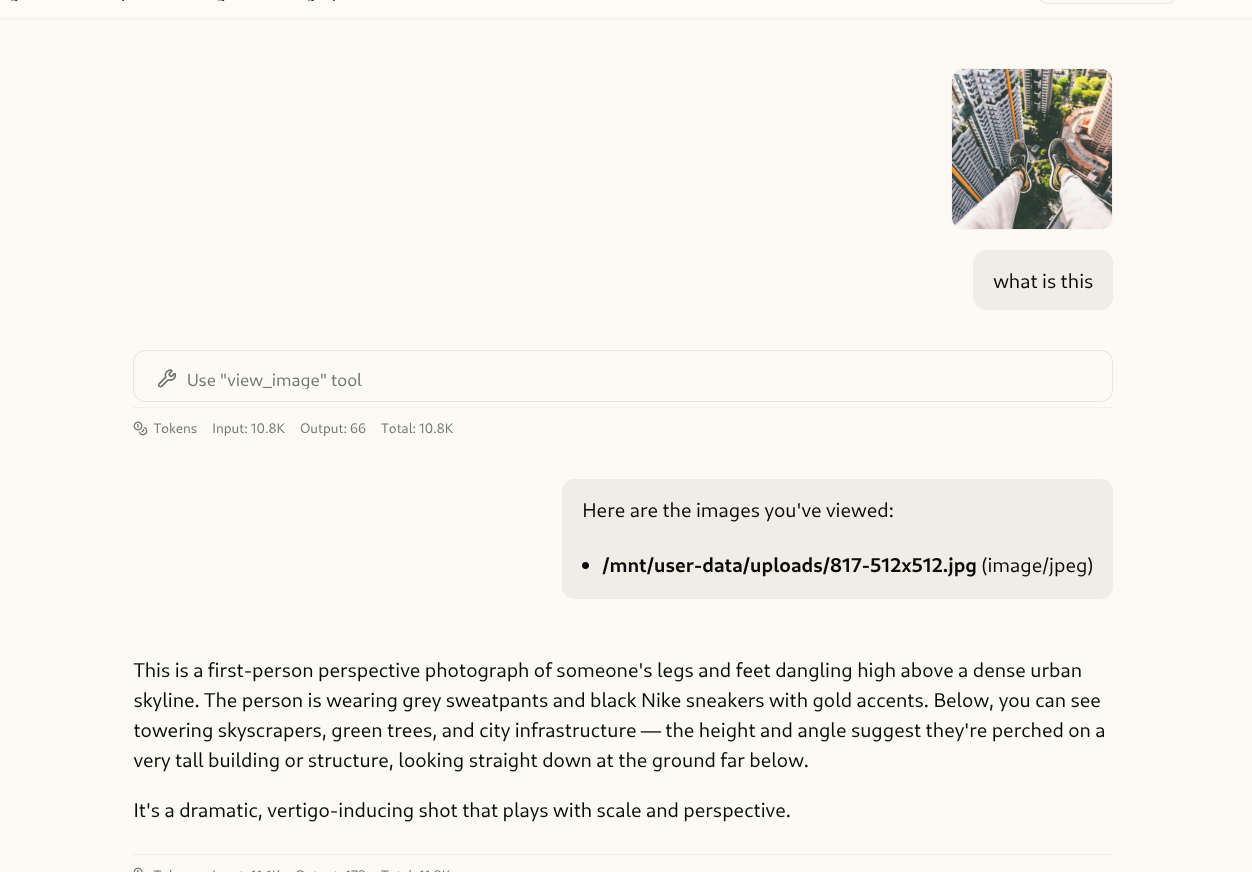
), open a new chat, upload a PNG file, and ask to describe, wait for a bit, then boom!I can also copy an image, and paste it to deerflow, which is very nice interface.
Qwen 3.6 describes an uploaded image in DeerFlow 2.0