Yi Tang Data Science and Emacs

Control the Plotting Order in ggplot2

nil

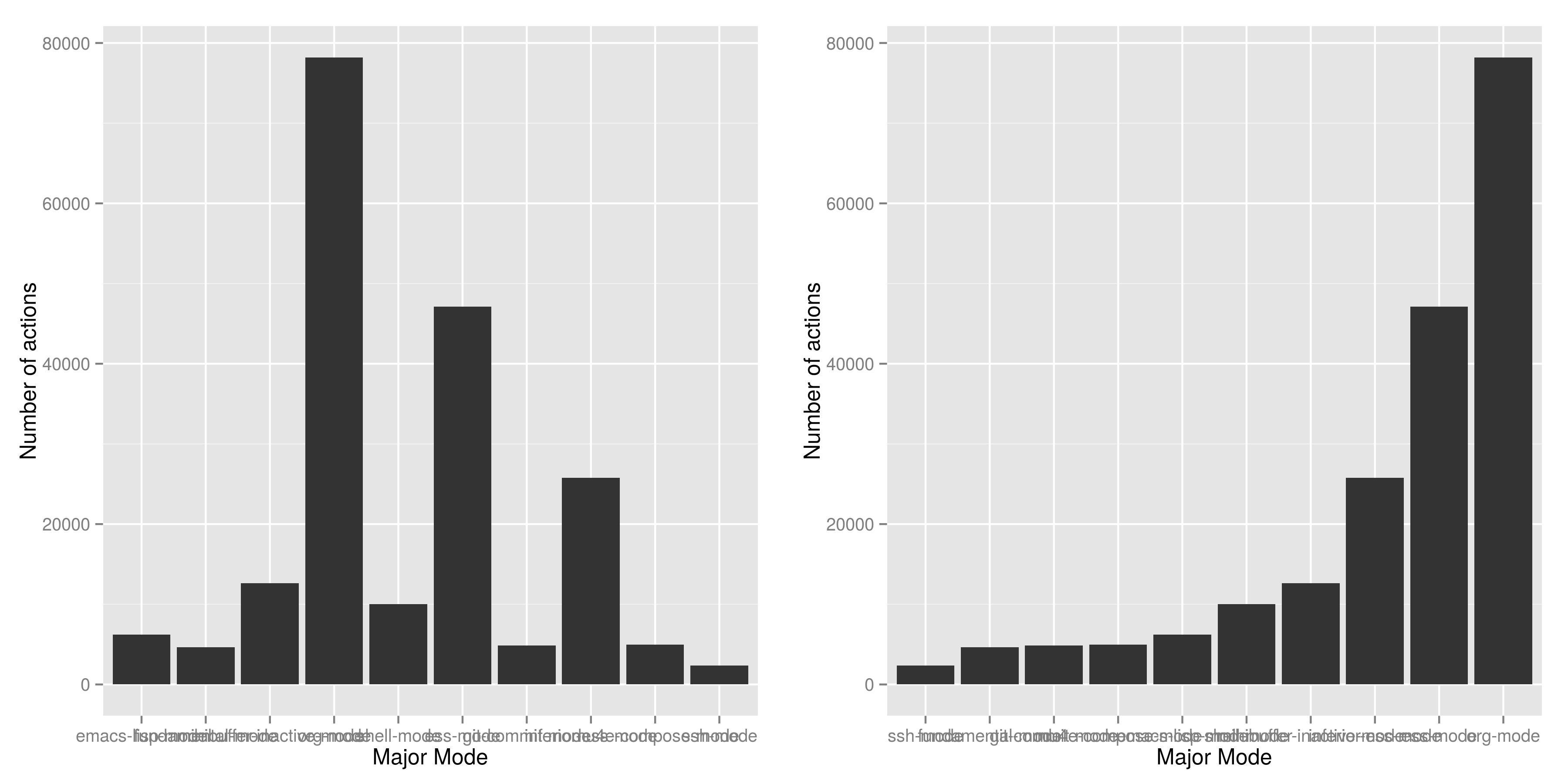
The above two plots show the same data (included below), and if you are going to present one to summarise your findings, which will you choose? It is very likely you are going to pick the right one, because

  1. the linear increasing feature of bars is pleasant to see,
  2. it is easier to compare the categories, the ones on the right has higher value than the ones on the left, and
  3. categories with lowest and highest value are clearly shown,

In this article I am trying to explain how to specify the plotting orders in ggplot to whatever you want and encourage R starters to use ggplot2.

To create a bar plot is dead easy in R, take this dataset as an example,

mode count
ssh-mode 2361
fundamental-mode 4626
git-commit-mode 4869
mu4e-compose-mode 4964
emacs-lisp-mode 6205
shell-mode 10046
minibuffer-inactive-mode 12624
inferior-ess-mode 25774
ess-mode 47115
org-mode 78195

to get the plot on the right side, reorder the table by count (it is already been done), then

with(df, barplot(count, names.arg = mode)) 

will do the job. That's simple and easy, it does what you provide. This is completely different to ggplot() paradigm, which does a lot computation behind the scene.

ggplot(df, aes(mode, count)) + geom_bar()

will give you the first plot; the categories are in alphabetically order. In order to get a pleasant increasing order that depends on the count or any other variable, or even manually specified order, you have to explicitly change the level of factors.

df$mode.ordered <- factor(df$mode, levels = df$mode)

create another variable mode.oredered which looks the same as mode, except for the underlying levels are in different. It is set to the order of counts. Run the same ggplot code again will give you the plot on the right. How does it work?

First, every factor in R is mapped into an integer, and the default mapping algorithm is

  1. sort the factor vector alphabetically,
  2. map the first factor to 1, and last to 10.

So emacs-lisp-mode is mapped to 1 and ssh-mode is mapped to 10.

What the reorder script can do is to sort the factors by count, so that ssh-mode is mapped to 1 and org-mode is mapped to 10, I.e. the factor order which are set to the order of count.

How does this affects ggplot? I presume ggplot do the plotting on the order of levels, or let's say on the integer space, I.e. do the plotting from 1 to 10, and then add the labels for each.

In this example, the default barplot function did the job. Usually we need to do extra data manipulation so that ggplot will do what we want, in exchange for the plot good better and may fits in the other plots. Without considering the time constraints, I would encourage people to stick with ggplot because like many other things in life, once you understand, it becomes easier to do. For example, it is actually very easy to specify the order manually with only two steps:

  • first, sort the whole data.frame to a variable,
  • then change the levels options in factor() to what ever you want.

To show a decreasing trends - the reverse order of increasing, just use levels = rev(mode). How neat!

Group Emacs Search Functions using Hydra

I am a search-guy: when I want to know something, I use the search functionality to locate to where has the keyword, and I didn't use my eyes to scan the page, it's too slow and harmful.

Emacs provides powerful functionality to do searching. For example, I use these commands very often (with the key-binds),

  1. isearch (C-s), search for a string and move the cursor to there,
  2. helm-swoop (C-F1), find all the occurrences of a string, pull out the lines containing the string to another buffer where I can edit and save,
  3. helm-multi-swoop M-X, apply helm-swoop to multiple buffers, very handy if I want to know where a function is called in different buffers.
  4. projectile-grep or helm-projectile-grep C p s g, find which files in current project contains a specific string, similar to helm-multi-swoop limits the search to files in project directory.

I love doing searching in Emacs, but the problem is to have to remember all the key-binds for different tasks. Also, sometimes, I forgot about what alternatives I have and usually go with the one that I most familiar with, which usually means not the right one. I sometimes realise I use isearch multiple times to do what ace-jump-word-mode can achieve by just once.

Org-mode Hydras incoming! gives me some idea to group all these functions together, and press a single key to perform different tasks, so this can free my mind from remembering all the key-binds. Also, I can write the few lines of text to reminds myself when to do what, and this potentially can solve problem two.

Here is the hydra implementation for searching:

(defhydra hydra-search (:color blue
                               :hint nil)
  "
Current Buffer : _i_search helm-_s_woop _a_ce-jump-word
Multiple Buffers : helm-multi-_S_woop
Project Directory: projectile-_g_rep helm-projectile-_G_rep
"
  ("i" isearch-forward)
  ("s" helm-swoop)
  ("a" ace-jump-word-mode)
  ("S" helm-multi-swoop)
  ("g" projectile-grep)
  ("G" helm-projectile-grep))
(global-set-key [f4] 'hydra-search/body)

So next time, when I want to search something, I just press F4, and then it brings up all the choices I have, and I don't need to worry about the key-binds or which to use! That's cool!

I am looking forward simplifying my Emacs workflow using hydra package, the key challenge is to identify the logical similarities among the tasks and then group them together accordingly. For hydra-search(), it is "search something on somewhere".

A Workflow for Using Git to Track SVN Repository

Version control system is a complex issues, and hard to understand the idea of branching and different types of merging. I merely understand the basic of Git, and it already makes my life a lot easier, I am managing about 10 repositories at this moment without much effort.

But my collages are using SVN as the centre storage for scripts. Switching to SVN is not a problem, I just need few weeks to transfer the knowledge and start to use it. I am reluctant to learn something basic and have duplicated knowledge, also, I use GitHub and Bitbucket which are Git based. But sticking to Git make mine work impossible to work with collauges.

Then I found out the Git developer has already made effort to bridge Git and other version control system, like SVN. The git svn allows me to just Git commands for staging, cherry-picking, pull etc, and then upload to the SVN remote repository with just one command line. I really like the idea of transferring the skills from one system to another without any cost, it makes me believe Git is great and I can continue to use Magit in Emacs!

Here is the basic steps and comments for this work flow:

  1. Create a folder mkdir ProjRepo
  2. Create an empty Git repository git init
  3. Add the following to .git/config
[svn-remote "svn"] url = https://your.svn.repo fetch = :refs/remotes/git-svn

and change the URL to right repository,

  1. pull from SVN central repository to this folder, git svn fetch svn
  2. switch to SVN remote branch, git checkout -b svn git-svn
  3. modify or add files
  4. use git add and git commit for snapshot local changes
  5. sometimes need to update local repository, git svn rebase
  6. finally upload local changes to SVN central repository git svn dcommit

See the official manual 8.1 Git and Other Systems - Git and Subversion git-svn documentation for more details.

Why Use Emacs 1 - Emacs Speaks Statistics

I am a Statistician, coding in R and write report is what I do most of the day. I have been though a long way of searching the perfect editor for me, tried Rstudio, SublimeText, TextMate and settled down happily with ESS/Emacs, for both coding and writing.

There three features that have me made the decision:

Auto Formatting

Scientists has reputation of being bad programmers, who wrote code that is unreadable and therefore incomprehensible to others. I have intention to become top level programmer and followed a style guide strictly. It means I have to spent sometime in adding and removing space in the code.

To my surprise, Emacs will do it for me automatically, just by hitting the TAB and it also indents smartly, which make me conformable to write long function call and split it into multiple lines. Here's an example. Also, if I miss placed a ')' or ']' the formatting will become strange and it reminders me to check.

rainfall.subset london,
rainfall.pairs,
rainfall.dublin)

Search Command History

I frequently search the command history. Imaging I was produce a plot and I realised there was something miss in the data, so I go back and fix the data first, then run the ggplot command again, I press Up/Down bottom many times, or just search once/two times. M-x ggplot( will give me the most recent command I typed containing the keyword ggplot(, then I press RET to select the command, which might be ggplot(gg.df, aes(lon, lat, col = city)) + geom_line() + ...... If it is not I want, I press C-r again to choose the second most recent one and repeat until I find right one.

Literate Programming

I am a supporter of literate statistical analysis and believe we should put code, results and discoveries together in developing models. Rstudio provides an easy to use tool for this purpose, but it does not support different R sessions, so if I need to generate a report, I have to re-run all the code from beginning, which isn't particle for me with volumes data because it will take quit long.

ESS and org-mode works really well via Babel, which is more friendly to use. I can choose to run only part of the code and have the output being inserted automatically, no need to copy/paste. Also, I can choose where to execute the code, on my local machine or the remote server, or both at the same time.

These are only the surface of ESS and there are lot more useful features like spell checking for comments and documentation templates, that makes me productive and I would recommend anyone uses R to learn ESS/Emacs. The following is my current setting.

;; Adapted with one minor change from Felipe Salazar at
;; http://www.emacswiki.org/emacs/EmacsSpeaksStatistics
(require 'ess-site)
(setq ess-ask-for-ess-directory nil) ;; start R on default folder
(setq ess-local-process-name "R")
(setq ansi-color-for-comint-mode 'filter) ;;
(setq comint-scroll-to-bottom-on-input t)
(setq comint-scroll-to-bottom-on-output t)
(setq comint-move-point-for-output t)
(setq ess-eval-visibly-p 'nowait) ;; no waiting while ess evalating
(defun my-ess-start-R ()
(interactive)
(if (not (member "*R*" (mapcar (function buffer-name) (buffer-list))))
(progn
(delete-other-windows)
(setq w1 (selected-window))
(setq w1name (buffer-name))
(setq w2 (split-window w1 nil t))
(R)
(set-window-buffer w2 "*R*")
(set-window-buffer w1 w1name))))
(defun my-ess-eval ()
(interactive)
(my-ess-start-R)
(if (and transient-mark-mode mark-active)
(call-interactively 'ess-eval-region)
(call-interactively 'ess-eval-line-and-step)))
(add-hook 'ess-mode-hook
'(lambda()
(local-set-key [(shift return)] 'my-ess-eval)))
(add-hook 'inferior-ess-mode-hook
'(lambda()
(local-set-key [C-up] 'comint-previous-input)
(local-set-key [C-down] 'comint-next-input)))
(add-hook 'ess-mode-hook
(lambda ()
(flyspell-prog-mode)
(run-hooks 'prog-mode-hook)
;; (prog-mode)
))

;; REF: http://stackoverflow.com/questions/2901198/useful-keyboard-shortcuts-and-tips-for-ess-r
;; Control and up/down arrow keys to search history with matching what you've already typed:
(define-key comint-mode-map [C-up] 'comint-previous-matching-input-from-input)
(define-key comint-mode-map [C-down] 'comint-next-matching-input-from-input)

Send Stylish MIME in Emacs

Last Updated: 18 Jan 2015

This is the first technical article in this blog, however the main purpose is not to analyse the problem and provide the solutions, but to tell a story of an ordinary person trying to pursuit his vision in a multi-languages environment (Emacs and HTML) that he only knows the basis. Hope you find it is interesting to read and for those who care the solution more than problem-solving approach, please see the last section.

The Problem

The first time I thought I need an fancy Email is when I sent an quick model update to my colleague; I have a table like this

Conditioning Variable Dependent Variable Probability
k >= 50 t >= 50 0.154
k >= 50 t >= 100 0.111
k >= 50 t >= 200 0.078

It was written in org-mode in which I can do the formatting quickly and nicely. But once copied over to Outlook, it looks messy, and the columns does not lineup.

| Conditioning Variable | Dependent Variable | Probability |
|---------------------------------------------------–—|
| k >= 50 | t >= 50 | 0.154 |
| k >= 50 | t >= 100 | 0.111 |
| k >= 50 | t >= 200 | 0.078 |

The correct way is to insert a table in Outlook. First, I have to export the table to a CSV file, than open it in Excel, and finally copy it over to Outlook which will recognised it as a table.

HTML Attachment Solution

I guess the purpose of that email is to give my colleague few numbers, in a way that he can compare and gain a feeling of the model. So the format is really necessary, but the workaround is really tedious.

I have another colleague who is an HTML expert and produced an company CSS style-sheet. He was kindly customised it to match the org-export class, i.e. org-ur, org-table, org-list.

So what I did was to export to org-file as a HTML and attached it in the email so that my colleague can simply click and open it in a browser, which will gives him a nicely formatted table. But people have hundreds email per day and seems to dislike attachments.

Paradise of MIME

I noticed Bernt Hansen pointed out in his famous Org Mode - Organize Your Life In Plain Text! that he use org-mime to sent HTML Email. MIME, standards for Multi-Purpose Internet Mail Extensions, is an extension to plain email and enable user to exchange rich data includes image, table, video etc.

The org-mime can parse the org file into an HTML code, in a way that the email server like Office365 or Gmail can recognise and render it with pre-defined styles.

The default style looks awful: the font, the colour, size, basically nothing is right. Recently I sent about 3-5 emails using this style, I doubt the reader will spent less time in reading and comprehend it, therefore the message is not conveyed.

But the workflow is fascinating: I call org-mime-subtree function, then I just type few email address, no need to switch to system or Outlook, everything is done in Emacs and at the exact point where the main content is generated.

So I was thinking, what if the email is look as good as the attachment? What if I can apply the style to the email, that would be looks fanatic!

I did my research, the org-mime indeed provides feature to let user to change the HTML style, two example are showed on worg. The package first generate the HTML file, and than search-and-replace a certain chunk, for example,

1
2
3
<p> 
  this is a paragraph 
</p>

will becomes something like this, depends on users specification,

1
2
3
<p style="blue">
  this is a paragraph 
</p>

The search-replace mechanics works fine, for a small email. It takes a pair value (element, style), where element can be paragraph, table, list and style can be colour, font, size etc. The problem is this pair is not quick match the standard CSS file,

1
2
3
4
5
6
7
body {
    font-family: "Helvetica Neue", "Lucida Grande", "Lucida Sans Unicode", Helvetica, Arial, sans-serif !important;
    font-size: 14px;
}
body #content {
    padding-top: 70px;
}

One can processing the CSS file, and feed the package a long list of pairs. But this approach seems not safe. I quickly skim the CSS file and found something I couldn't understand, for example the body #content block above.

Hack org-mime

I think the most problem-free approach is to follow org-export-html and ensure the generated Email has same style as exported HTML and org-MIME package will eventually implement this, but I don't to wait and decide to hack.

The script is formatted in a nice way, and looks like a textbook C program: it first declares variable and functions, with concise documentation so one can visualise the structure after reading 5-10 minutes. But the implementation is way beyond my knowldge on Emacs-Lisp language. I almost looked up each function that be used, take this snippet for example,

1
2
3
4
5
6
 
(with-temp-buffer
  (insert html)
  (goto-char (point-min))
  (run-hooks 'org-mime-html-hook)
  (buffer-string))

I have no idea of what does it means. You know the feeling when you try to learn an foreign language but took the wrong book that way above your level, and you find there no single word you could understand, and you was like What The Hell? That was my feeling.

The strategy I came up was to build up my Emacs-Lisp vocabulary: try to understand the functions/processes and translate it into a plain English, for example,

with-temp-buffer
create a temporary buffer
insert
insert the string, in this case, called html, at point.
goto-char
move the cursor, which is called point in emacs, to somewhere
point-min
means the begining of a buffer/file
run-hook
run functions that links to org-mime-html-hooks
buffer-string
return a buffer as a string

Now that I understand each words, I need to comprehense it and combine than together to understand the mean of this snippet. I tried to write in a plain English and the first attempt is like this

create temporary buffer, insert the generated html file, than move the cursor to the very start, and than apply other functions that links to org-mime-htmize

I continue this word-sentence-paragraph process and I understand few functions. But it can goes on and on, and the more I learn about Emacs lisp, the future away I digress from my original goal: apply the style sheet to HTML email. I guess this is a common dilemma in working with multi-languages. Usually I follow my interests but this time I choose to focus on achieving the goal.

MIME Solution

It turned out it is a right decision. The concept of "inline-CSS" is mentioned int the script, I googled and found out the solution within 10 minutes. I realised that what I need to do is add a block in beginning of the HTML mail!! BINGO!

1
2
3
4
5
6
<head>
  <style>
    ...
  </style>
</head>
;; html email content starts here 

Emacs Configuration

Here's the settings:

1
2
3
4
5
6
7
8
9
10
11
12
(require 'org-mime)
(add-hook 'org-mime-html-hook
          (lambda ()
            (insert
             "       
<head>
<style>
;; content of the .css file 
</style>
</head>"
             ))
          t)
If you have any questions or comments, please post them below. If you liked this post, you can share it with your followers or follow me on Twitter!